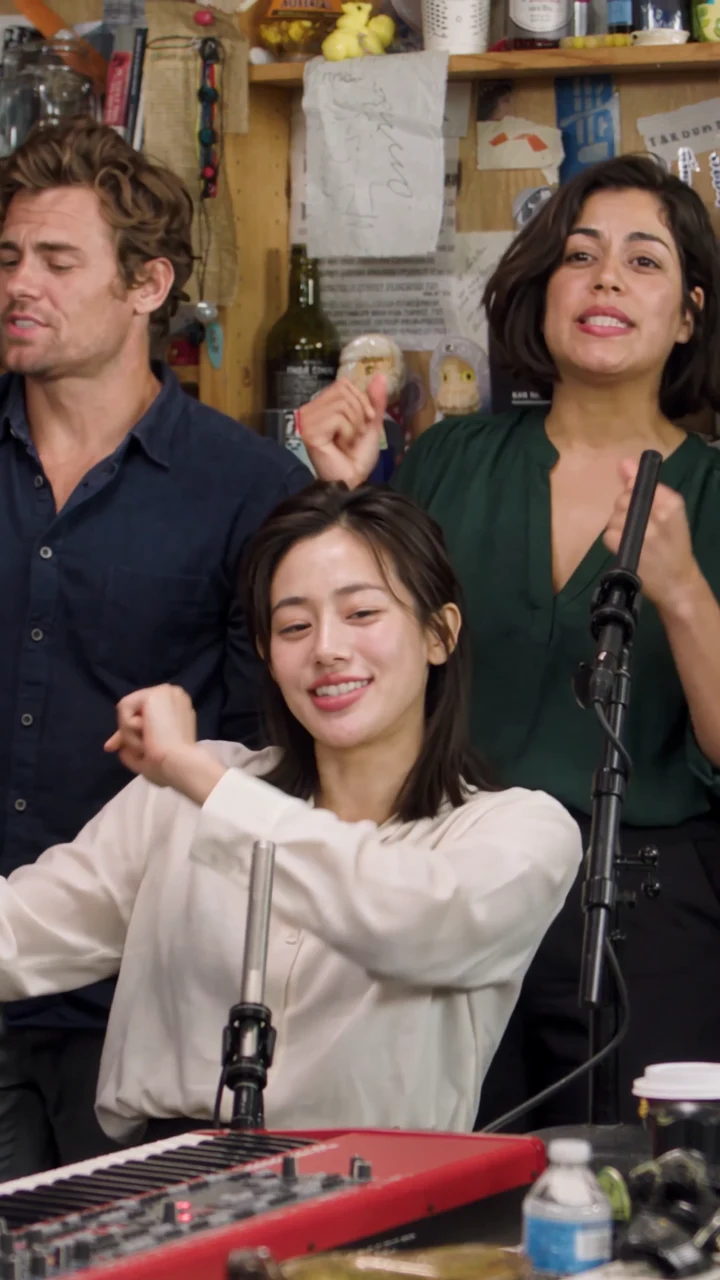
About this scene

Back Row

The reference is a 15-second vertical clip with the original soundtrack. Replace either or both standing singers behind the red keyboard in the opening shot. The keyboard player, lead singer and sax player keep their original roles. Start as a guest with one photo. Add more photos to replace more roles. Generating a video uses credits.

Role positions for Back Row

Make a clip

0 of 2 photos added
Resolution

Two seats behind the keyboard

Replace either or both standing singers behind the red keyboard in the opening shot. The keyboard player, lead singer and sax player keep their original roles.

The reference is a 15-second vertical clip with the original soundtrack. The opening shot shows the trio around a red keyboard, followed by the lead singer's laughing close-up and the sax solo.

Reference performance

The opening shot shows the trio around a red keyboard, followed by the lead singer's laughing close-up and the sax solo.

Reference clip

Back Row reference

The reference is a 15-second vertical clip with the original soundtrack. Replace either or both standing singers behind the red keyboard in the opening shot. The keyboard player, lead singer and sax player keep their original roles.

Example clip

Two photos, left then right

Use one clear, front-facing photo per seat, with the face unobstructed.

  • Back left is the standing performer in a dark blue shirt on the viewer's left.

  • Back right is the standing performer in green on the viewer's right.

  1. Back left

    Back left is the standing performer in a dark blue shirt on the viewer's left. Add one clear photo for this seat.

  2. Back right

    Back right is the standing performer in green on the viewer's right. Add one clear photo for this seat.

Replace the standing singers

  1. Open Back Row

    Open the scene and locate the intended face on the role map.

  2. Assign your photos

    Add one photo per role you want to change.

  3. Generate with the quote shown

    Choose a resolution and review the quote before generating.

When Back Row fits

  • Two friends behind the keyboard

    Use the two slots for the people who should sing on the left and the right while the keyboard player, the close-up, and the sax stay.

  • Only the left singer, or only the right

    Upload the one photo you have and leave the other slot empty. The empty side keeps the standing singer already there.

  • Change a different performer

    Use Whole Band to assign a photo to the sax player in the final shot.

What this scene costs

Back Row is quoted from the scene and the resolution you select, whether you fill one slot or both. The second photo is not a separate fee on this page. Current packs and checkout come from the live catalog. A failed generation returns the deducted credits to your balance.

Loading current pricing…

Back Row questions

Who do the two Back Row photos replace?

Back left is the standing performer in a dark blue shirt on the viewer's left. Back right is the standing performer in green on the viewer's right.

Do they appear in the close-up or the sax shot?

Both standing singers appear only in the opening shot.

Can I leave one of the two seats empty?

Yes. An empty slot keeps that singer.

Does this scene replace the keyboard player?

The keyboard player is kept in Back Row. Choose Whole Band to replace that seat.

Change the two singers behind the keys

Replace either or both standing singers behind the red keyboard in the opening shot. The keyboard player, lead singer and sax player keep their original roles.

Replace the back row

Sign in